
For people who write all day. And just want to fix text.
Fix text without switching tabs
SwiftFIX fixes text where you write it.
Right-click any text and choose “Fix my Text”.
No prompts.
No copy-paste.
Free with your own API key. Or buy credits. No subscriptions.
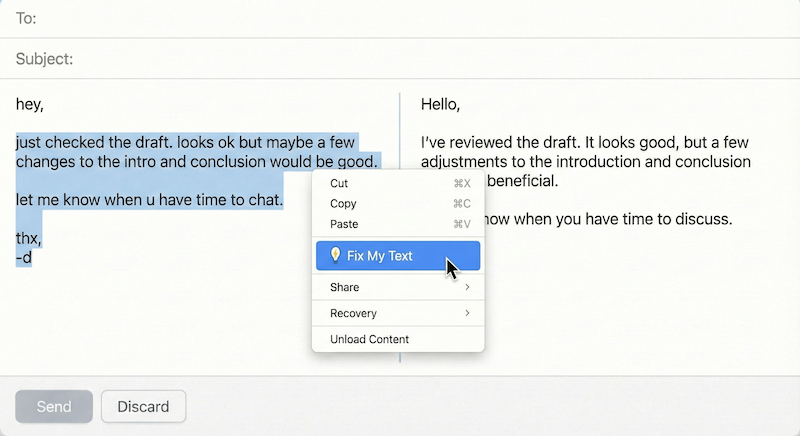
Most AI tools are built to generate text.
SwiftFIX is built to fix it.
It doesn’t write for you. It polishes what you already wrote.
A lot of writing time goes into small fixes.
Every day, you touch up short pieces of text:
- emails
- chat messages
- comments
- social media posts
- drafts that only need cleanup
But fixing them usually means:
- switching tabs
- copying text into chat tools
- explaining what you want changed
- pasting it back and fixing it again
That friction adds up.
It’s not because the work is hard. It’s because it interrupts your flow for something that should take seconds.
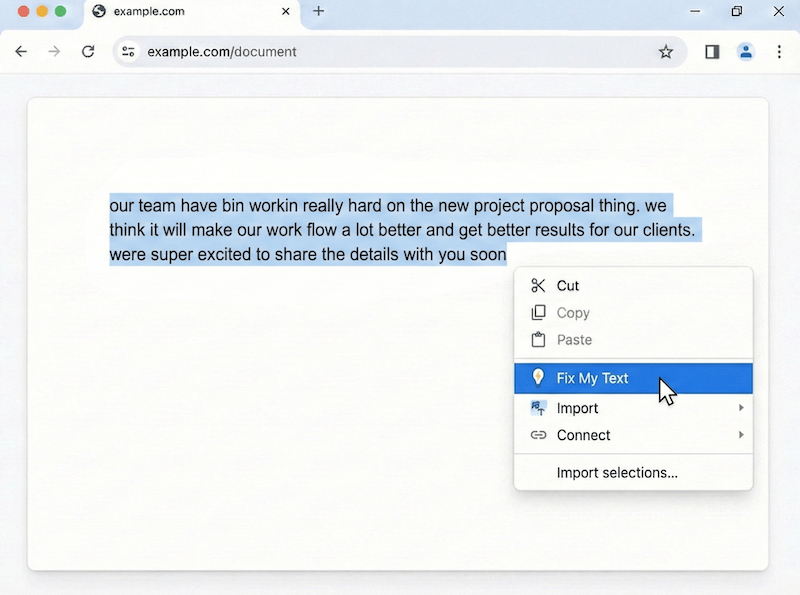
One click. Fixed text.
SwiftFIX cleans up text directly where it's written.
- Corrects spelling, grammar, and punctuation
- Improves clarity and flow without changing your intent
- Refines rough or uneven writing into clean, readable text
No formatting issues.
No hidden markup.
No surprises.
Built for fixing, not generating
When you just need to clean something up, chat tools slow you down.
Chat-based AI tools usually mean
- switching context
- typing prompts
- back-and-forth
- outputs you still have to adjust
SwiftFIX is simpler
You already wrote the text.
You just want it cleaned up.
- fixes text in place
- keeps your voice
- finishes in one click
Most writing tools try to help all the time. SwiftFIX only shows up when you ask.
How It Works
Designed to disappear
Write naturally
Type full sentences, rough notes, or uneven drafts.
Right-click and choose “Fix my Text”
No prompts to explain. No settings to adjust.
Edit, copy, or replace
The result stays editable. You stay in control.
SwiftFIX works anywhere you can type: email, chats, forms, docs, and social posts.
A note about privacy
Your text stays yours
SwiftFIX does not store, log, or retain your text. Your text is sent to the language model only when you click “Fix my Text”. Nothing is saved, tracked, or reused by SwiftFIX.
If you use your own API key, your text is handled directly by your chosen provider.
Keep your voice. Lose the rough edges.
SwiftFIX does not rewrite your message or invent new ideas.
- Fixes mistakes
- Smooths phrasing
- Improves clarity
The text still sounds like you. Cleaner. Finished.
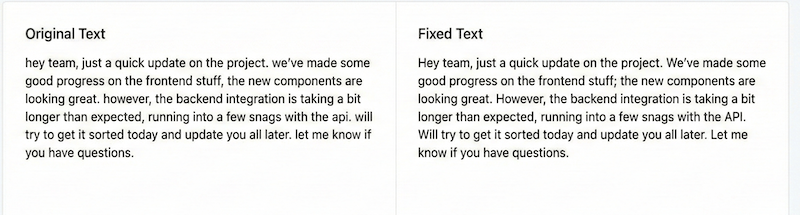
Built for real-world fixing
Emails
Clean up drafts or rough replies before hitting send.
Work chats and messages
Fix fast messages without slowing down the conversation.
Comments and social posts
Improve clarity and flow without changing tone.
Forms and applications
Eliminate small mistakes that create bad impressions.
Longer text that needs cleanup
Refine what you wrote without starting over.
Notes and internal memos
Turn rough notes into clear, readable updates.
If you wrote it, SwiftFIX can fix it.
No subscriptions. Use it your way.
Free with your own API key, or use credits when you need them.
Use your own API key
Free
- Unlimited fixes
- Use OpenAI, Claude, or Gemini
- Your usage is billed directly by your provider
Use credits
One-time purchase
- No API key required
- Credits never expire
- Use SwiftFIX when you need it
No subscriptions.
No lock-in.